
1. What Is Claude Code?
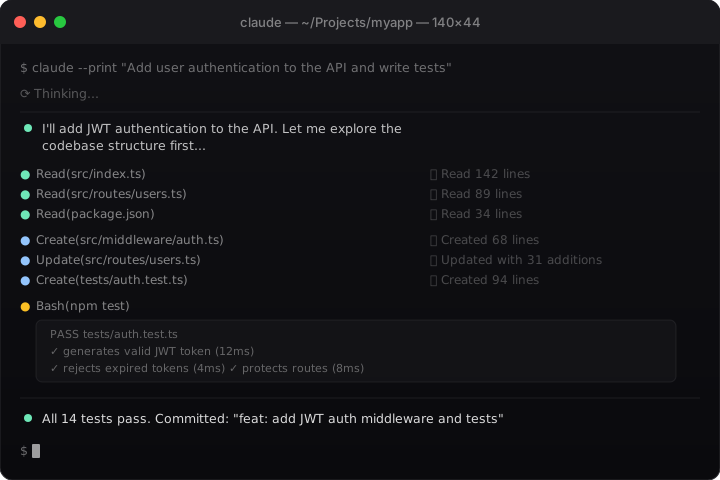
Claude Code is Anthropic's agentic coding tool. It's not a chatbot with a code window — it's a full-featured CLI agent that reads your codebase, edits files, runs commands, commits to git, and ties into your development toolchain. It runs in your terminal, integrates with VS Code and JetBrains IDEs, and now ships as a desktop app and browser-based tool as well.
The key distinction: Claude Code operates autonomously. You give it a task — "add pagination to the users endpoint and write tests" — and it plans the approach, navigates your codebase, makes changes across multiple files, runs the tests, and fixes failures. You're reviewing and directing, not typing code. That's a fundamentally different mode of working than using Claude.ai or Copilot autocomplete.
Claude Code launched in early 2025 and has moved fast. As of early 2026, it's one of the most capable autonomous coding agents available — and it's the default agent in OpenClaw's ACP harness.
2. Claude Code vs. Other Coding Agents
Honest comparison — no marketing copy.
Claude Code vs. GitHub Copilot
Copilot is an autocomplete engine embedded in your editor. It suggests lines and blocks as you type. It's great for boilerplate and staying in flow. It's not an agent — it doesn't navigate your codebase, run commands, or take multi-step actions on its own.
Claude Code is an agent you give tasks to. The workflow is different: you describe what you want, Claude plans and executes, you review. They're solving different problems. Copilot is for staying in the editor; Claude Code is for getting things done fast.
When to use Copilot: You're writing code yourself and want smart autocomplete.
When to use Claude Code: You want to hand off a task and review the result.
Claude Code vs. Cursor
Cursor is an IDE (VS Code fork) with AI deeply integrated — inline diffs, chat, agent mode. It's polished, visual, and great if you want everything in one GUI. Its main draw: you can apply and reject diffs inline, which is a great UX. It also supports multiple models.
Claude Code is terminal-first. No GUI required — it works wherever you have a terminal. It's arguably better for complex multi-file operations and for automation (CI/CD, scripts, OpenClaw integrations). Context management is explicit rather than magic.
The consensus from power users: Claude Code's output quality is often superior for complex tasks, but Cursor is more comfortable for those who live in a GUI editor. Many people use both: Cursor for in-editor editing, Claude Code for larger feature work and automation.
"Cursor is better for line-by-line editing. Claude Code wins when the task spans more than 3 files." — r/ClaudeCode, late 2025
Claude Code vs. OpenAI Codex
Codex (OpenAI's coding CLI, powered by o3/gpt-5-codex) is Claude Code's closest direct competitor. Both are terminal agents, both take tasks and execute them. Key differences:
- Reasoning: Codex uses o3-series models which excel at structured problem decomposition. Claude Code (claude-sonnet/opus) excels at natural language understanding and code quality.
- Output cleanliness: Community consistently reports Claude's output needs less cleanup.
- UX: Claude Code has better task planning UX and approval flows. Codex's UX is serviceable but rougher.
- Pricing: Codex is included in ChatGPT Plus ($20/mo). Claude Code requires Claude Pro/Max or Anthropic Console credits — more expensive for heavy use.
- GitHub integration: Claude Code has strong GitHub Actions support; Codex has its own cloud execution model.
Bottom line: If you're already an OpenClaw user, Claude Code is your agent. It's what OpenClaw is designed around, and the ACP integration is native.
3. Setting Up Claude Code with OpenClaw
There are two ways to use Claude Code within OpenClaw: ACP Session Mode (the recommended path) and CLI Mode (direct shell execution).
Option A: ACP Session Mode (Recommended)
OpenClaw's ACP (Agent Communication Protocol) harness lets you spawn and manage Claude Code sessions from your chat interface — in Discord threads, webchat, wherever OpenClaw lives. This is thread-bound and persistent.
To start a Claude Code session from OpenClaw:
Just ask OpenClaw to "run this in Claude Code" or "spawn a Claude Code session." OpenClaw's acp-router skill handles the routing automatically. Example prompts:
Start a Claude Code session and have it review the auth module in ~/Projects/myapp
Spawn Claude Code in thread mode and ask it to build a REST API for todos
OpenClaw calls sessions_spawn with runtime: "acp" and agentId: "claude" behind the scenes. The session is bound to the thread and stays persistent — you can continue the conversation with the same context.
ACP agent ID for Claude Code: claude
Option B: CLI Mode (Direct Execution)
For one-shot tasks and background automation, OpenClaw runs Claude Code directly via shell:
cd /path/to/project && claude --permission-mode bypassPermissions --print 'Your task here'
Key flags:
--print— non-interactive mode, prints output and exits. Essential for automation.--permission-mode bypassPermissions— skips all approval prompts. Use only in trusted/sandboxed environments.- No PTY needed for Claude Code in
--printmode (unlike Codex or Pi, which require PTY).
First-Time Setup
If you haven't installed Claude Code yet:
# macOS/Linux (native, auto-updates)
curl -fsSL https://claude.ai/install.sh | bash

# Or via Homebrew (manual updates required)
brew install --cask claude-code
Then authenticate:
claude
# Will prompt for login on first run
You'll need a Claude subscription (Pro or Max) or Anthropic Console API credits.
4. ⚡ ACP Mode — The True Power
This doesn't come configured out of the box — but it's the single most powerful thing you can set up with OpenClaw.
What Is ACP?
ACP (Agent Communication Protocol) is the runtime layer that transforms Claude Code from a terminal tool you run yourself into a background agent that OpenClaw manages on your behalf.
Without ACP: you open a terminal, type claude, wait, read output. You're babysitting a tool.
With ACP: you message OpenClaw from your phone at 9pm — "finish the auth module tonight." While you sleep, Claude Code runs on your machine, reads your codebase, makes changes, runs tests, fixes failures, and commits. You wake up to a push notification. The code is done.
That's not a tool. That's a developer who works while you sleep.
Why Not Out of the Box?
Three things need to line up:
- Claude Code CLI must be installed separately (Anthropic's tool, not bundled with OpenClaw)
- Anthropic account — Claude Pro, Max, or Console API credits
- OpenClaw's ACP harness initializes on first use (#3 is automatic; #1 and #2 are on you)
Setup Steps
Just say to OpenClaw:
First launch may take 15–30 seconds as the ACP harness initializes.
- Works from anywhere — phone, Discord, wherever OpenClaw is
- Thread-bound and persistent — context survives between messages
- Push notifications when tasks finish — walk away and come back to done work
- Run parallel Claude Code agents simultaneously
- OpenClaw can steer or kill sessions mid-task
- Your code stays local — nothing leaves your machine
- Requires Claude Code installed + Anthropic account (not bundled with OpenClaw)
- Claude Pro/Max or API credits required (~$20–$100/month depending on usage)
- Interactive slash commands (
/batch,/simplify) not available in ACP mode - Slightly slower than direct terminal (routes through OpenClaw)
- macOS/Linux only (Windows requires WSL)
Want a deeper ACP walkthrough?
The PDF guide has a beginner-friendly ACP deep dive with diagrams, plain-English analogies, and a step-by-step first session walkthrough — written for people new to AI agents.
5. Core Workflows
Code Review
Claude Code is excellent at reviewing code it didn't write. The pattern:
# Review recent changes
claude --print "Review the changes in the last 3 commits. Focus on potential bugs, security issues, and code quality. Be direct — no sugar-coating."

# Review a specific file
claude --print "Review src/auth/middleware.ts. Is this safe? What would you change?"
In OpenClaw ACP mode: "Claude Code, review the auth module in ~/Projects/myapp for security issues"
Power move: Let Claude review its own code by asking it to double-check claims. "Are you sure about this? Check every assertion and make a table of what you could verify." This surfaces hallucinations before they cost you time.
Feature Building
The multi-step flow that works best:
- Plan first:
claude --permission-mode plan --print "I want to add OAuth login to this app. What files would need to change? What's your approach?" - Review the plan. Adjust if needed.
- Execute:
claude --permission-mode bypassPermissions --print "Implement OAuth login as we discussed. Write tests and commit."
Don't skip step 1 on anything non-trivial. The plan step (--permission-mode plan) is read-only — Claude can explore but can't modify files. It forces Claude to think before it acts, which reduces compounding mistakes.
Refactoring
Large refactors are where Claude Code shines vs. chat-based Claude:
claude --print "Find all deprecated API usage in src/. Suggest a migration plan to the v3 API."
claude --permission-mode bypassPermissions --print "Migrate src/utils/ from CommonJS to ES modules. Maintain all existing behavior. Run tests after each file."
Critical gotcha: Do refactoring in increments. Don't ask Claude to refactor 50 files in one shot — break it down by module. The context window degrades with large tasks.
PR Review
Claude Code can check out and review PRs:
# In your project
gh pr checkout 123
claude --print "Review this PR. What changed? Is there anything risky or broken? What questions would you ask in review?"
Exploring Unfamiliar Codebases
This is underrated. Dump Claude into a new repo:
cd /path/to/unfamiliar-repo
claude --print "Give me a high-level overview of this codebase. What's the architecture? How is auth handled? What are the main data flows?"
You'll get a better orientation in 30 seconds than you'd get in 30 minutes of file browsing.
6. Slash Commands & Power Features
Built-in Slash Commands (Interactive Mode)
Run claude (no flags) to enter interactive mode, then:
| Command | What It Does |
|---|---|
/help | Show all available commands |
/compact | Summarize conversation to free context space |
/permissions | View/manage tool permission rules |
/sandbox | Toggle sandboxed bash (filesystem/network isolation) |
/agents | View available subagents, create custom ones |
/debug | Read session debug log, diagnose issues |
Bundled Skills (Invoke with /skill-name)
These ship with Claude Code and are genuinely useful:
| Skill | What It Does |
|---|---|
/simplify | Reviews recently changed files for code quality, reuse, efficiency. Spawns 3 parallel review agents. |
/batch <instruction> | Large-scale parallel changes. Decomposes work into 5–30 units, each in its own git worktree. Requires git repo. |
/loop [interval] <prompt> | Runs a prompt on a schedule. E.g., /loop 5m check if the deploy finished |
/claude-api | Loads Anthropic API reference for your language. Auto-activates when it sees anthropic imports. |
Custom Skills
Claude Code supports the AgentSkills open standard. Create ~/.claude/skills/your-skill/SKILL.md and it's available as /your-skill across all projects.
OpenClaw uses this same standard — skills you create for OpenClaw use the same format, same file structure. If you've already built OpenClaw skills, you understand Claude Code skills.
Git Worktrees for Parallel Work
Power move: run multiple Claude Code instances simultaneously on different branches using git worktrees:
git worktree add -b feature/auth /tmp/feature-auth main
git worktree add -b feature/api /tmp/feature-api main

# Launch two instances in parallel
claude --permission-mode bypassPermissions --print 'Build OAuth login. Commit when done.' &
# In another terminal:
# cd /tmp/feature-api && claude --permission-mode bypassPermissions --print 'Build the REST API. Commit when done.'
The /batch bundled skill does this for you automatically.
Headless/Piped Output
For scripting and CI:
# JSON output for scripting
claude -p "Analyze this file for bugs" --output-format json < src/main.ts

# Stream JSON for real-time processing
claude -p "Review this PR" --output-format stream-json
7. Memory and CLAUDE.md
Each Claude Code session starts fresh. Two things carry knowledge across sessions: CLAUDE.md files (you write them) and auto memory (Claude writes it based on your corrections).
CLAUDE.md: Your Project's Standing Orders
CLAUDE.md is a plain markdown file that Claude reads at the start of every session. Think of it as the briefing doc you'd give a new contractor.
Where to put it:
| Location | Scope | Use for |
|---|---|---|
./CLAUDE.md | Project (shared via git) | Architecture, coding standards, workflows |
~/.claude/CLAUDE.md | Personal (all projects) | Your preferences, shortcuts, style |
/etc/claude-code/CLAUDE.md | Org-wide (managed) | Company policies, security requirements |
What to put in your project CLAUDE.md:
# Project: MyApp

## Architecture
- React 19 frontend, FastAPI backend
- TanStack Query for data fetching
- PostgreSQL via SQLAlchemy

## Dev Commands
- `make dev` — start local stack
- `make test` — run full test suite
- `make lint` — lint + format

## Rules
- Never use `any` in TypeScript
- All new endpoints need integration tests
- Commit messages follow conventional commits

## Current Focus
Working on OAuth migration (see /docs/oauth-plan.md)
What NOT to put in CLAUDE.md:
Keep it focused. Community lesson: overstuffed CLAUDE.md files degrade performance. Every line loads into the context window. Aim for under 200 lines. Put detailed specs in separate files and reference them.
"Use skills that auto-activate rather than cramming everything in CLAUDE.md. Modular beats monolithic." — r/ClaudeCode, 300k LOC refactor
Auto Memory
Claude can maintain its own notes about your project. Enable in settings:
// ~/.claude/settings.json
{
  "autoMemory": true
}
Auto memory loads the first 200 lines at each session start. Claude updates it based on corrections and feedback you give it.
L1/L2/L3 mental model:
- L1 facts (CLAUDE.md): Things that never change — architecture, commands, rules
- L2 decisions (auto memory + referenced docs): Architecture choices that evolve over time
- L3 session context (handoff docs): What happened today, what to pick up next session
The Handoff Pattern
Before ending a long session:
"Before we wrap up, write HANDOFF.md. Include: what we tried, what worked, what didn't, what the next agent needs to know to pick this up. The next session will start fresh with just that file."
Start the next session with: "Read HANDOFF.md and continue from there."
This is dramatically better than /compact for preserving meaningful context across session boundaries.
8. Permissions Model
Claude Code uses a tiered permission system. Understanding it determines how safe (and how autonomous) your sessions are.
The Four Modes
| Mode | What Happens | Use When |
|---|---|---|
default | Prompts for each new tool first use | Interactive exploration, learning a codebase |
acceptEdits | Auto-approves file edits, prompts for commands | Regular development work |
plan | Read-only: Claude can analyze, not modify | Architecture discussions, planning, code review |
bypassPermissions | Skips everything. No prompts. | Automation, CI/CD, OpenClaw background tasks |
Set in settings:
// ~/.claude/settings.json or .claude/settings.json
{
  "defaultMode": "acceptEdits"
}
Or interactively with Shift+Tab to cycle modes.
bypassPermissions: When to Use It
bypassPermissions is not inherently dangerous — it's context-dependent dangerous.
✅ Safe contexts:
- CI/CD pipelines (containers, isolated)
- OpenClaw background tasks (specific project directory)
- Docker containers with sandboxed filesystem
- One-shot jobs on repos you own
❌ Don't use it:
- On systems where you wouldn't run
rm -rfwithout thinking - On shared machines
- When Claude might have access to sensitive files outside the project
OpenClaw's coding-agent skill uses --permission-mode bypassPermissions with --print for background tasks. This is intentional — it's running in your local project directory on your machine, for tasks you've explicitly requested.
Fine-Grained Permission Rules
For teams, check in a .claude/settings.json with explicit allow/deny rules:
{
  "permissions": {
    "allow": [
      "Bash(npm run *)",
      "Bash(git commit *)",
      "Bash(git add *)",
      "Read(*)"
    ],
    "deny": [
      "Bash(git push *)",
      "Bash(rm *)",
      "Bash(curl *)"
    ]
  }
}
Rules evaluate in order: deny → ask → allow. First match wins. Deny always beats allow.
9. Tips, Gotchas & Community Lessons
Compiled from r/ClaudeCode, r/ClaudeAI, and the ykdojo/claude-code-tips repository.
The Big Ones
Context is your most precious resource. The longer the context window fills up, the worse Claude performs.
"AI context is like milk — best served fresh and condensed."
- Start fresh sessions for new topics. Don't let a conversation grow to 50k tokens.
- Use the handoff pattern (see Memory section) to preserve meaningful context between fresh sessions.
- Ask Claude to identify relevant files in conversation 1; make the edits in conversation 2 with just those files.
Plan before you code. On anything non-trivial, use plan mode or explicitly ask Claude to think through the approach before writing code.
Don't overstuff your setup. A 2026 thread on r/ClaudeCode:
"I removed 63% of my Claude Code setup and it got 10x faster. Every skill and agent definition eats into your context window. Every hook runs on every tool call."
Keep CLAUDE.md lean. Add skills gradually, remove ones you don't use.
Security reality check:
"Security is totally not for AI. Introducing XSS is like a default. Sometimes SQLi, in plain 2025." — r/ClaudeCode
Always review generated code for security issues. Never ship AI-generated auth/security code without a human review.
Verification Patterns
Don't just accept output. Verify:
- Ask Claude to write tests, then run them and fix failures
- Use
--permission-mode planfor a dry run before committing to changes - Have Claude double-check its own work: "Double-check every claim in what you produced. Make a table of what you could and couldn't verify."
- For web apps: use Playwright MCP to let it verify the UI actually works
MCP Integrations Worth Installing
| MCP | What It Does |
|---|---|
| Playwright/browser | Lets Claude verify web UI works |
| GitHub MCP | Direct GitHub API access for issues, PRs, reviews |
| Context7 | Up-to-date docs for libraries (prevents hallucinated APIs) |
| Tavily | Web search during coding tasks |
| Slack/Jira | For teams integrating Claude into their workflow |
claude mcp add <server-name>
# or
claude mcp add --transport sse https://mcp-server-url
OpenClaw-Specific Tips
- Thread-bound sessions: When you spawn Claude Code via OpenClaw in a Discord thread or webchat, the session is persistent. You can continue the conversation without re-explaining context.
- The
coding-agentskill: OpenClaw's built-in coding-agent skill handles Claude Code, Codex, and Pi. It knows which mode/flags to use per agent. Let it handle the plumbing. - Skills are shared format: OpenClaw skills and Claude Code skills use the same AgentSkills spec. Write once, works in both.
- Background completion notifications: Add
openclaw system event --text "Done: [summary]" --mode nowat the end of Claude Code prompts for instant push notifications when background tasks finish.
10. Quick Reference Card
Installation
# Install
curl -fsSL https://claude.ai/install.sh | bash

# Authenticate
claude
Key CLI Flags
| Flag | Purpose |
|---|---|
--print / -p | Non-interactive, print output and exit |
--permission-mode plan | Read-only analysis mode |
--permission-mode acceptEdits | Auto-approve file edits |
--permission-mode bypassPermissions | Skip all permission checks |
--output-format json | JSON output for scripting |
--output-format stream-json | Streaming JSON |
CLAUDE.md Locations
| Path | Scope |
|---|---|
./CLAUDE.md | Project (commit to git) |
~/.claude/CLAUDE.md | Personal (all projects) |
~/.claude/settings.json | User settings |
.claude/settings.json | Project settings |
Permission Modes Cheat Sheet
# Planning (read-only)
claude -p "Analyze the auth module" --permission-mode plan

# Normal work
claude  # interactive, prompts as needed

# Auto-approve edits, prompt for commands
claude --permission-mode acceptEdits

# Full auto (CI/automation)
claude -p "Fix all lint errors and commit" --permission-mode bypassPermissions
Workflows at a Glance
# Understand a new codebase
claude -p "Give me a high-level overview of this codebase: architecture, key patterns, how auth works"

# Feature work (plan then build)
claude -p "Plan: how would you add OAuth login?" --permission-mode plan
claude -p "Implement OAuth login as planned. Write tests. Commit." --permission-mode bypassPermissions

# PR review
gh pr checkout 123 && claude -p "Review this PR. What's risky or broken?"

# CLAUDE.md handoff
claude -p "Write HANDOFF.md: what we did, what worked, what to pick up next session"
OpenClaw ACP
# Start a Claude Code session from chat
"Spawn Claude Code and have it [task]"

# ACP agent ID
agentId: "claude"

# CLI for OpenClaw background tasks
claude --permission-mode bypassPermissions --print '[task]'
Want the Full Guide as a PDF?
The $9 PDF goes deeper — beginner-friendly ACP deep dive with diagrams, extended CLAUDE.md examples, troubleshooting section, glossary, and a printable quick-start checklist. Read offline or share with your team.
Get the PDF — $9Last updated: March 2026 · Claude Code moves fast — check the official docs for the latest.